

Why saccos switch
Sound familiar?
The parcel book doesn’t match the cash box
Prices are agreed at the counter, receipts are handwritten, and nobody can say where the difference went.
M-PESA payments with no parcel attached
Money lands on the till with a masked number, and the clerk scrolls through messages trying to guess whose it is.
“Is my parcel on the vehicle?”
Customers call the office all day, and the office calls the conductor, who is driving.
Parcels go missing between stages
Nobody notices a parcel never arrived until the receiver turns up asking for it.
Released to the wrong person
Someone describes the parcel well enough and walks off with it. The real receiver arrives an hour later.
The Communications Authority asks for your register
Contents, values and sender IDs are scattered across exercise books at every office.
How it works
From the counter to collection in four steps
1. Book and get paid
The clerk picks the route and weight, and the price comes from your tariff. The customer pays by M-PESA prompt, paybill, till or cash, and an 80 mm label with a QR code prints straight away.
2. Load and depart
Only paid parcels can be loaded. Scan each label onto the trip, print the manifest and depart; the ETA is worked out from the route time.
3. Receive at the destination
The destination office scans parcels off the vehicle. Anything missing is flagged to the manager at once, and the receiver gets an SMS that the parcel is ready.
4. Release and close the day
The receiver shows the pickup code from their SMS and, where your rules require it, their ID. Storage fees are added for late collection, and the day’s cash and M-PESA are ready to check.
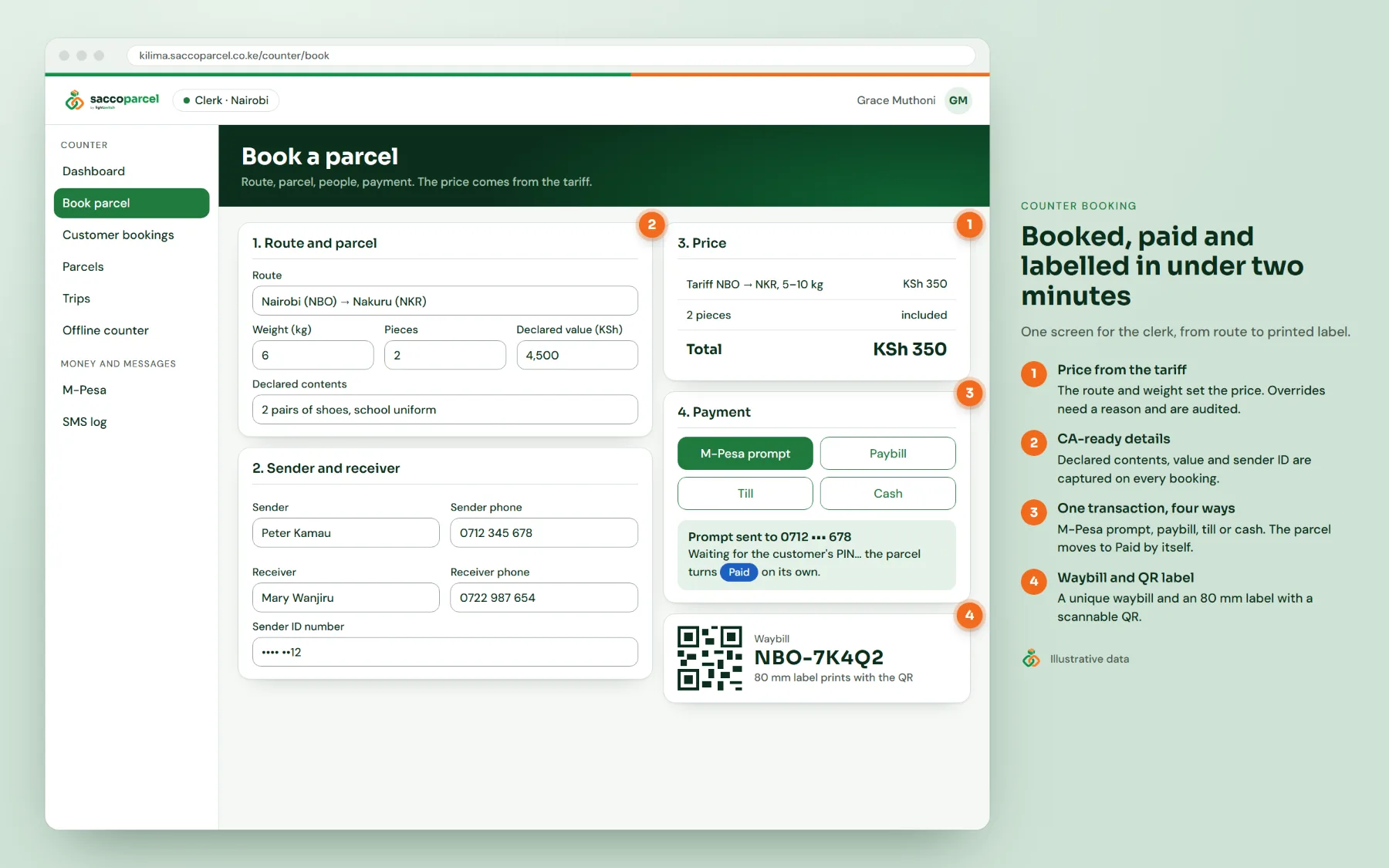
Booked, paid and labelled before the next customer steps up
One screen takes the clerk from route to printed label. No haggling, no handwritten receipts.
- Price from your tariff by route and weight; any override needs a reason and is recorded
- Declared contents, declared value and sender ID captured on every booking
- Payment in one transaction: M-PESA prompt (STK push), paybill, till or cash
- Unique waybill number and an 80 mm thermal label with a scannable QR code
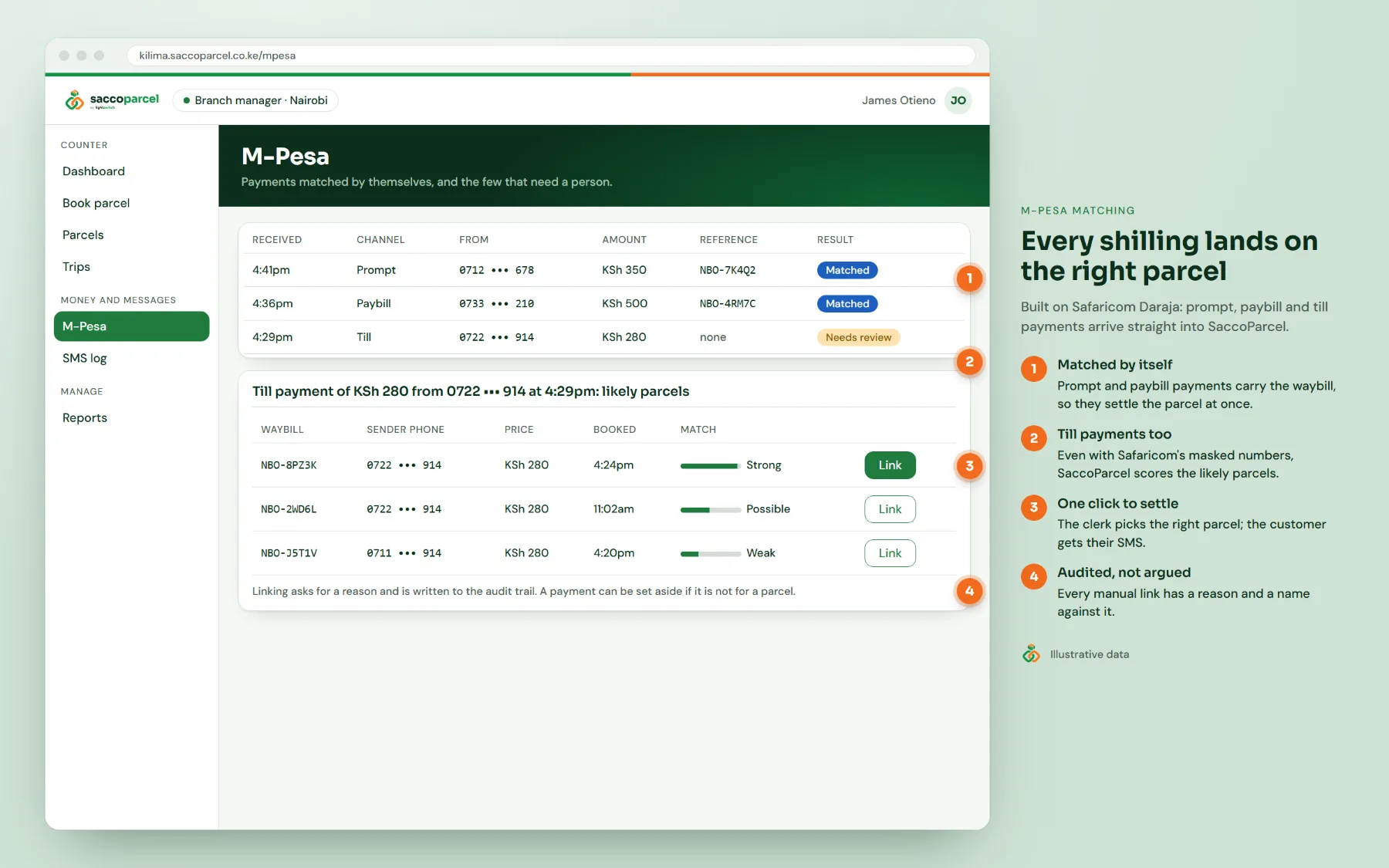
M-PESA that matches itself
SaccoParcel connects to Safaricom Daraja, so payments arrive in the system the moment the customer enters their PIN.
- Prompt and paybill payments carry the waybill and settle the parcel by themselves
- Till payments with masked numbers are scored against likely parcels for the clerk to confirm
- Every manual link needs a reason and is written to the audit trail
- Your own paybill or till, per office or one for the whole sacco
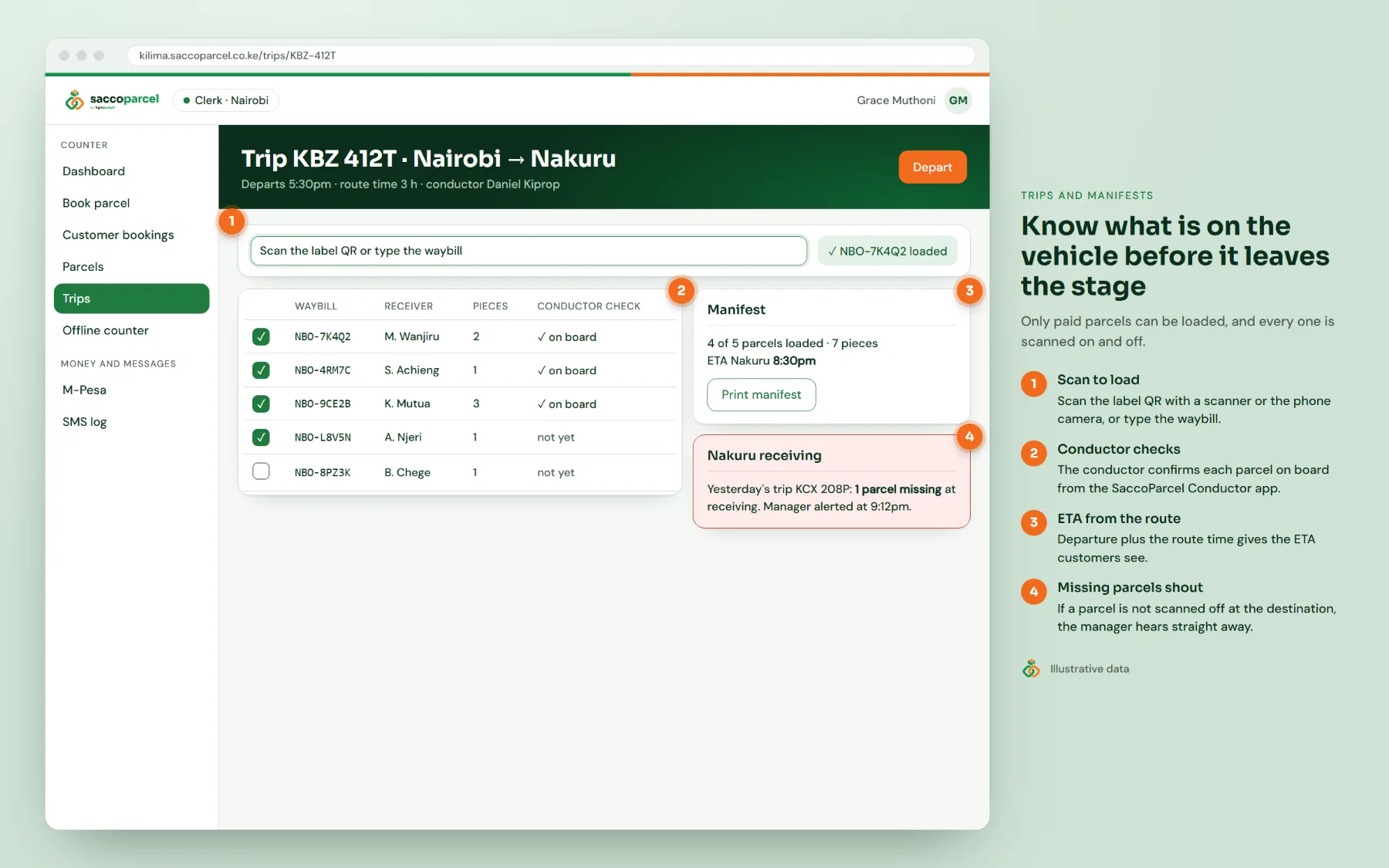
Know what is on the vehicle before it leaves the stage
Every parcel is scanned on at the origin and scanned off at the destination, so nothing slips between offices.
- Scan the label QR with a barcode scanner or phone camera, or type the waybill
- Printable manifest per trip, with the ETA from the route time
- Missing parcels at receiving alert the manager straight away
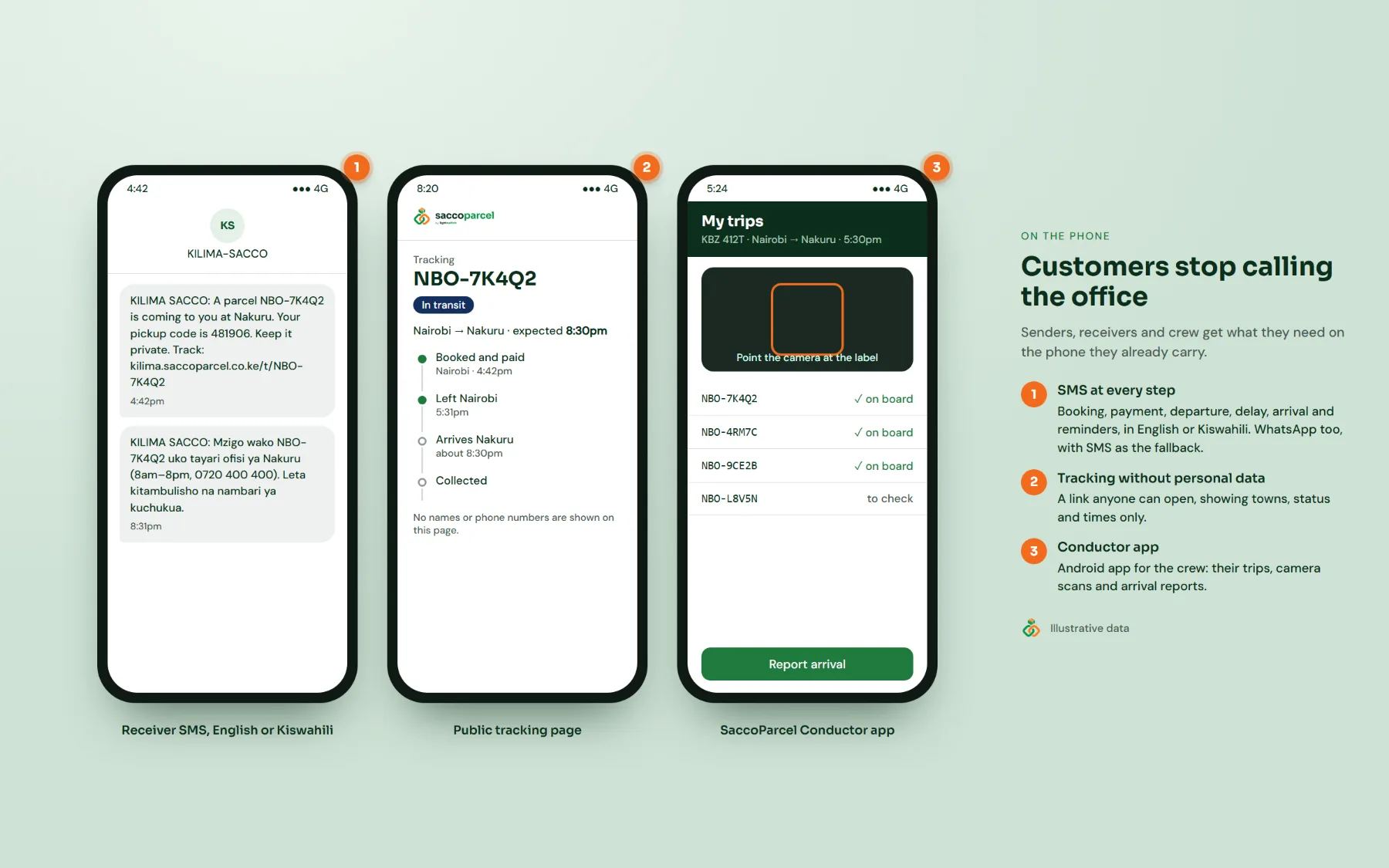
- Conductors confirm parcels on board and hand-overs from the SaccoParcel Conductor app
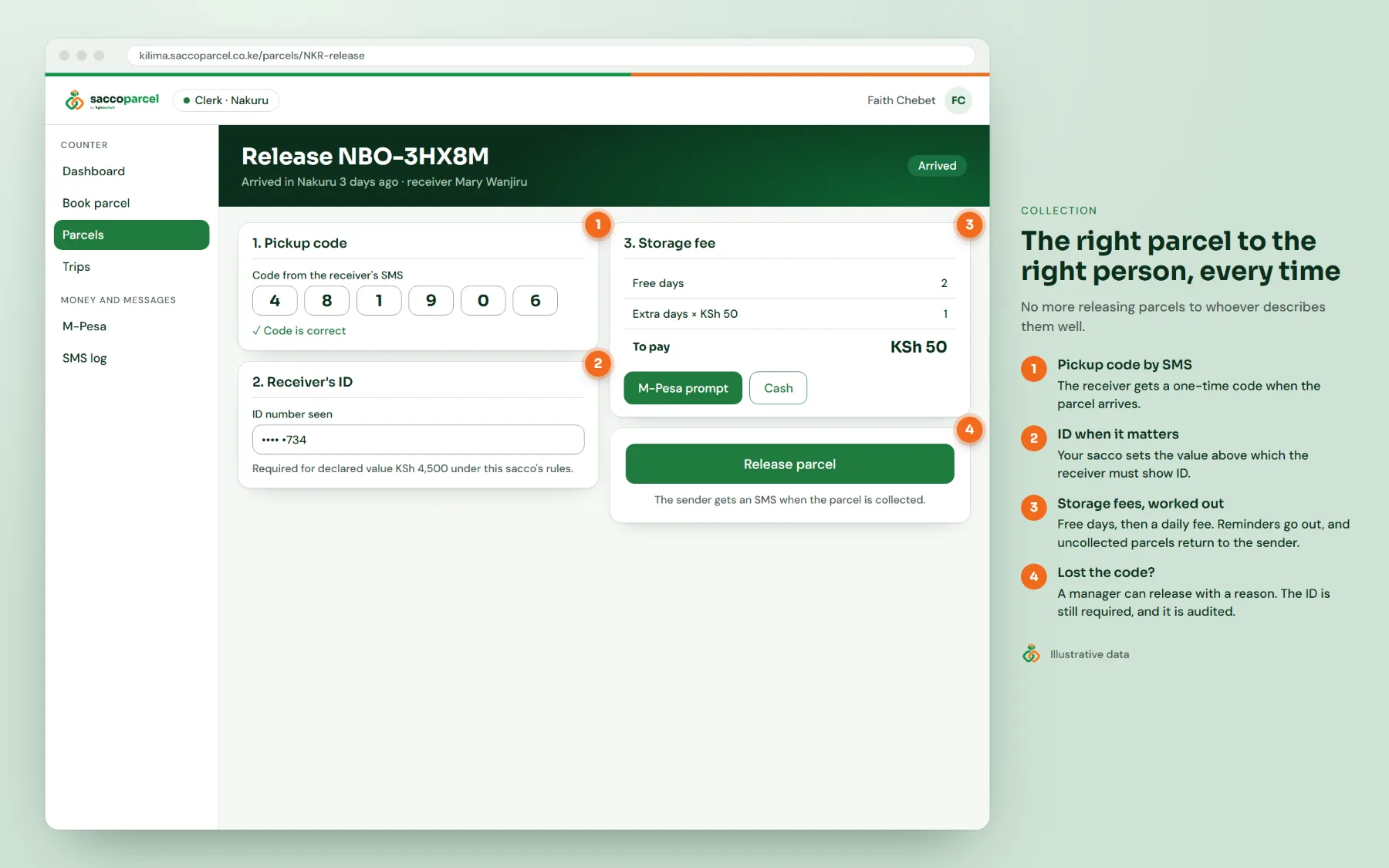
The right parcel to the right person, every time
A parcel leaves your office only with proof that the person collecting it should have it.
- A one-time pickup code sent to the receiver by SMS
- Receiver ID required above a declared value your sacco sets
- Storage fees after the free days, reminders, and return to sender when nobody collects
- Lost code? A manager can release with a reason, the ID is still checked, and it is recorded
Customers stop calling the office
Senders and receivers hear from you before they think to ask.
- SMS at booking, payment, departure, delay, arrival and collection, in English or Kiswahili
- Late parcels detected from the route time, with an apology SMS before the customer calls
- A public tracking link that shows towns, status and times, never names or phone numbers
- Optional WhatsApp messages, with SMS as the automatic fallback
Keep booking when the internet doesn’t
Stages lose connection. Your counter shouldn’t stop.
- Offline counter: book and print labels with no internet; bookings upload by themselves when the connection is back
- SaccoParcel Counter and Conductor apps for Android and Windows
- Customers can book ahead by USSD or on your web page and pay by M-PESA; the clerk just weighs and accepts
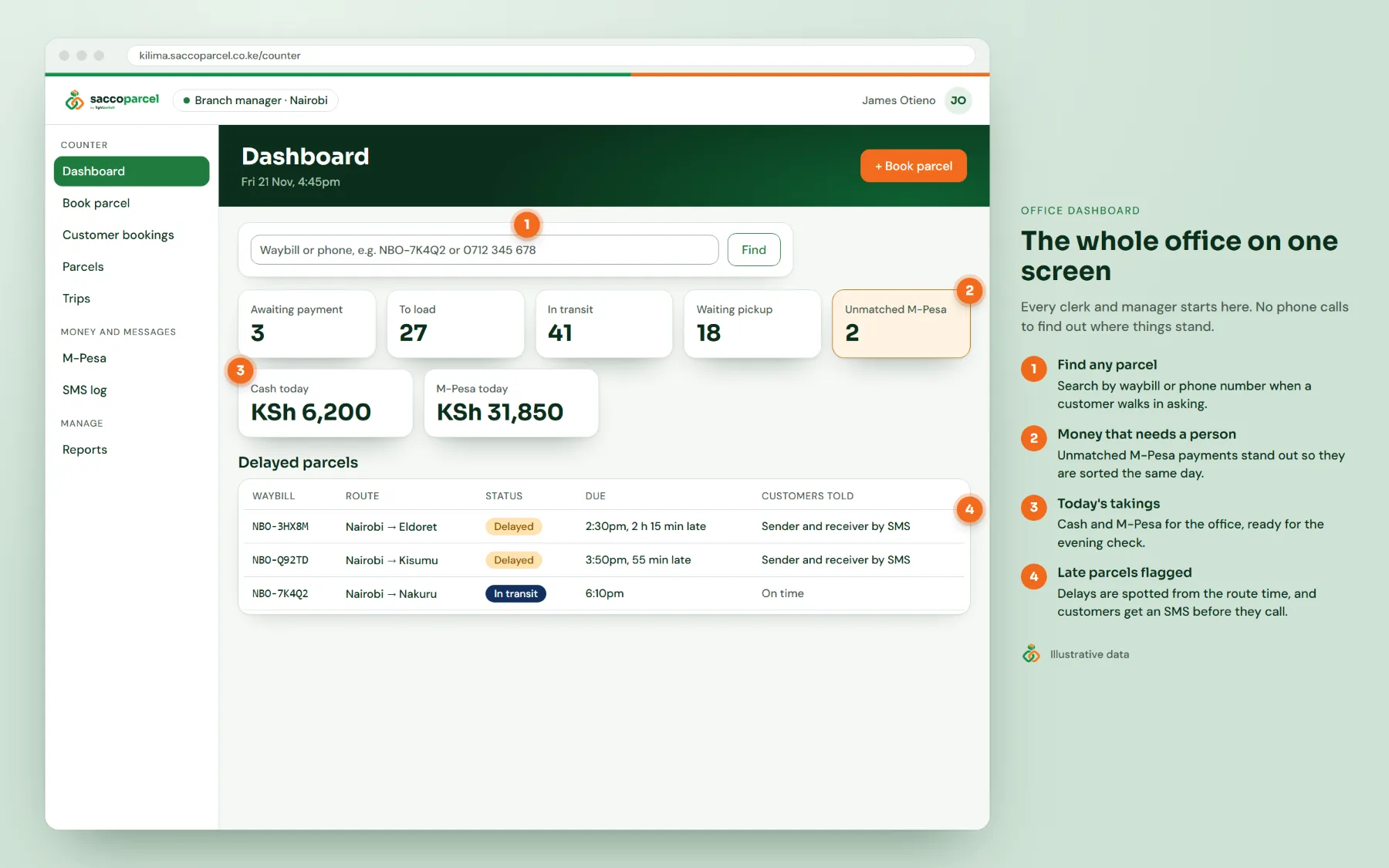
See every office before you close for the day
Managers and sacco admins get the figures without phoning each stage.
- Collections by office, payment method and clerk
- Parcels by status, parcels waiting for collection and delay rate by route
- M-PESA reconciliation against the Safaricom statement, with a cash book per clerk
- Communications Authority consignment register, exported to CSV in one click
Who it's for
Made for the saccos that move Kenya
Matatu saccos
Carrying parcels between towns on every trip.
Bus and shuttle companies
A parcel desk at each booking office.
Saccos with many offices
One view of every stage.
Licensed courier operators
Who must keep a Communications Authority register.
Saccos starting a parcel service
Who want it right from day one.
Control
Your sacco, your rules, a clear record
A role for everyone
Clerks book and release. Conductors check parcels on board. Managers approve overrides. Only sacco admins change prices and setup. Each person sees only their own office.
A trail of who did what
Price overrides, manual payment links, cancellations, releases without a code and setup changes are recorded with a name, time and reason.
Sign-in that can’t be shared
Every staff member signs in with a password and a code from an authenticator app on their phone.
Customer data handled properly
Phone numbers are masked on screen, tracking pages show no personal details, and admins can answer Data Protection Act requests to export or erase a customer’s data.
Compare
Why not the parcel book?
| Feature | SaccoParcel | Parcel book and receipts | Spreadsheet and WhatsApp |
|---|---|---|---|
| Price from a set tariff | Yes | By hand | Partly |
| M-PESA matched to the parcel | Yes | No | By hand |
| Label with QR and waybill | Yes | No | No |
| Scan on and off the vehicle | Yes | No | No |
| Missing-parcel alerts | Yes | No | No |
| SMS to sender and receiver | Yes | No | By hand |
| Release by pickup code | Yes | No | No |
| Delay alerts | Yes | No | No |
| Communications Authority register | Yes | By hand | By hand |
| One view of every office | Yes | No | Partly |
Comparison based on typical manual and spreadsheet setups.
Specification
Technical details
| Runs on | Any modern browser on a counter PC, laptop or tablet; Android and Windows apps for the counter and conductors |
|---|---|
| Hosting | Hosted and maintained by Lightswitch; each sacco’s data is kept separate from every other sacco |
| Payments | Safaricom Daraja: M-PESA STK push, paybill and till (C2B), plus cash |
| Messaging | SMS through Africa’s Talking, with delivery reports; optional WhatsApp; English and Kiswahili templates you can edit |
| Printing | 80 mm thermal printers for labels and receipts; A4 for manifests and reports |
| Scanning | USB or Bluetooth barcode scanners, or the phone camera in the Conductor app |
| Offline | Counter booking and label printing without internet; automatic upload when the connection returns |
| Security | Two-factor sign-in for all staff, role-based access per office, full audit trail, encrypted data on devices |
| Compliance | Communications Authority consignment register (CSV); Data Protection Act export and erasure |
| Exports | Reports and registers to CSV for your accountant |
FAQ
SaccoParcel questions
What equipment do we need?
A computer or tablet with a browser at each office, an 80 mm thermal printer for labels, and ideally a barcode scanner. Conductors use the Android app on their own phones. We can advise on printers and scanners that work well.
Can we use our existing paybill or till?
Yes. SaccoParcel connects to your own Safaricom shortcodes, either one for the whole sacco or one per office, so the money goes straight to your account.
Does it need internet?
Most of the time, yes, so every office sees the same parcels straight away. If the connection drops, the offline counter keeps booking and printing labels, and uploads the bookings when it comes back.
Will our clerks manage it?
Yes. If a clerk can send M-PESA, they can book a parcel. Every screen says what to do next, and there is a step-by-step guide in English and Kiswahili. We train your team on site or by video call.
Does it help with Communications Authority requirements?
SaccoParcel records the declared contents, value and sender ID on every booking and exports the consignment register in one click. Licensing itself stays with your sacco.
Can customers book without coming to the office?
Yes. Customers can book by USSD or on your SaccoParcel web page and pay by M-PESA. They drop the parcel at the counter, where the clerk weighs it and accepts it.
How is it priced?
You pay a small fee per parcel booked, billed monthly, so the cost grows with your parcel business. Book a demo and we’ll give you a quote for your routes and volumes.
Who owns the data?
Your data is yours. Each sacco’s records are kept separate, and we can export your parcels, payments and registers whenever you need them.
Free demo
Get your SaccoParcel demo access
Send the form and we'll email you the demo link and sign-in straight away. We'll also call you to arrange a guided walk-through, by Zoom, phone or at your premises.
- 0724776933
- WhatsApp us
- hello@lightswitch.co.ke
- 51 Lenana Rd, Block A, Suite A4, Nairobi Kenya
- Mon–Fri 8:00–17:00