

Why agencies switch
Sound familiar?
Tenants pay, but who paid?
An M-PESA message says KES 45,000 from a number you do not know, for an account nobody typed correctly.
Arrears found at month end
By the time someone adds up the book, three tenants are two months behind and the reminder is awkward.
Invoices typed one by one
Rent, service charge and water for every unit, every month, copied into SMS by hand.
Owner statements take days
Collected, commission, deposits, what was paid straight to the owner and the MRI due, all from spreadsheets.
Bank transfers in a different place
PesaLink and transfers land in the bank, so the statement and the rent book never quite agree.
A receipt book anyone can write in
Cash receipts get lost, altered or faked, and there is no record of who received what.
How it works
From the first unit to the owner statement in four steps
1. Set up your portfolio
Owners, properties and their shares. Units one by one or as ranges like A1-A20. Or import it all from one Excel workbook.
2. Move tenants in
Tenant, lease, deposit and first invoice in four steps. Pro-rata rent for mid-month move-ins. A Paybill account number per lease, like KIL-A3.
3. Bill and collect
Monthly billing run with a preview, never billed twice. M-PESA Paybill and Till payments receipted automatically. Bank and PesaLink from the uploaded statement.
4. Follow up and report
Arrears ageing with one-click bulk SMS. Automatic reminders before and after the due date. Owner statements with commission and MRI.
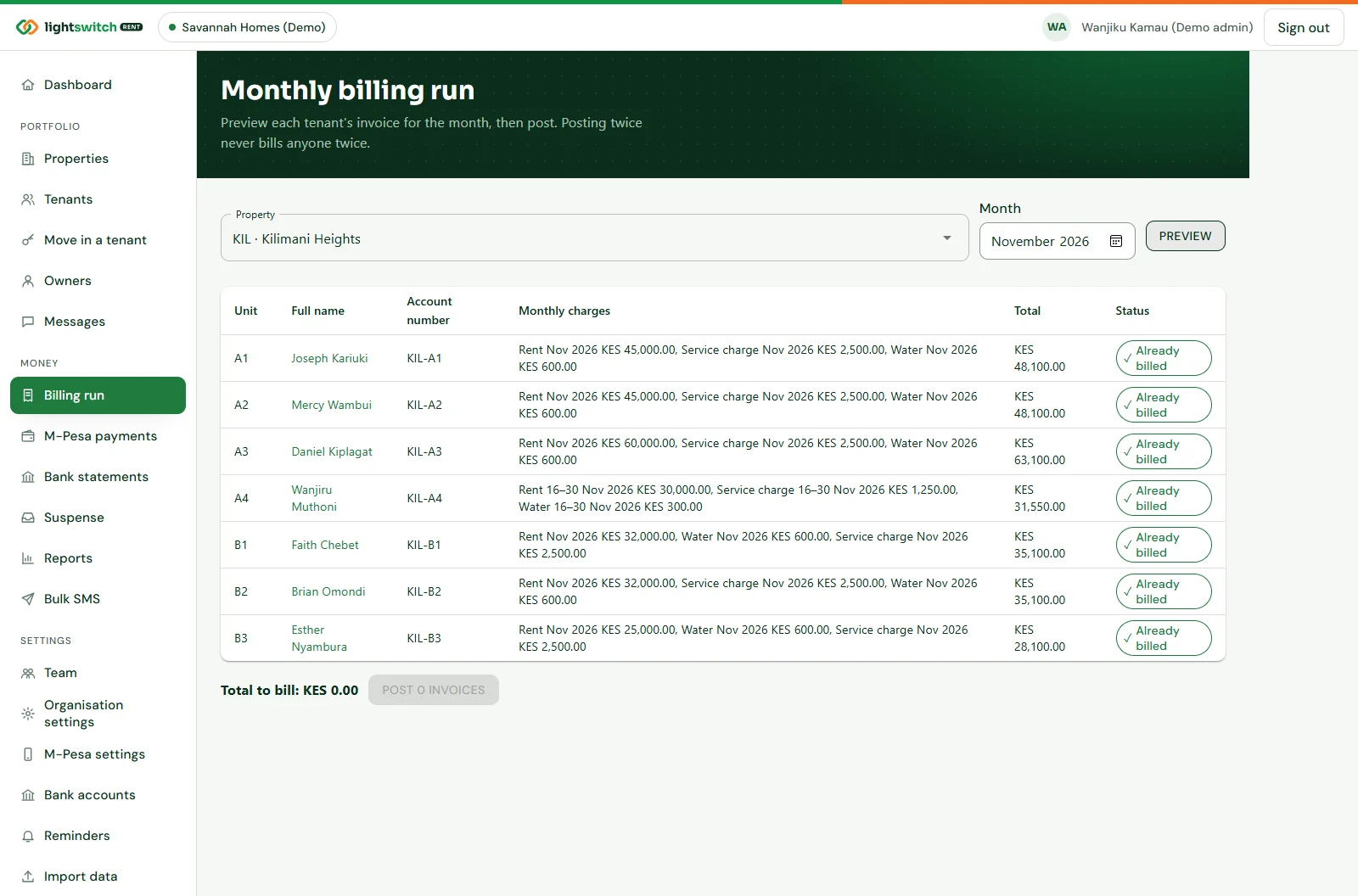
Every invoice for the month in one run
Pick the property and the month, check each tenant’s line, then post. Rent and monthly charges come from the lease, and each tenant gets their invoice by SMS with a link to pay.
- Preview before posting; posting again never bills anyone twice
- Daily automatic billing on each lease’s billing day
- Gapless invoice, receipt and credit note numbers
- Invoice and receipt PDFs with a QR code
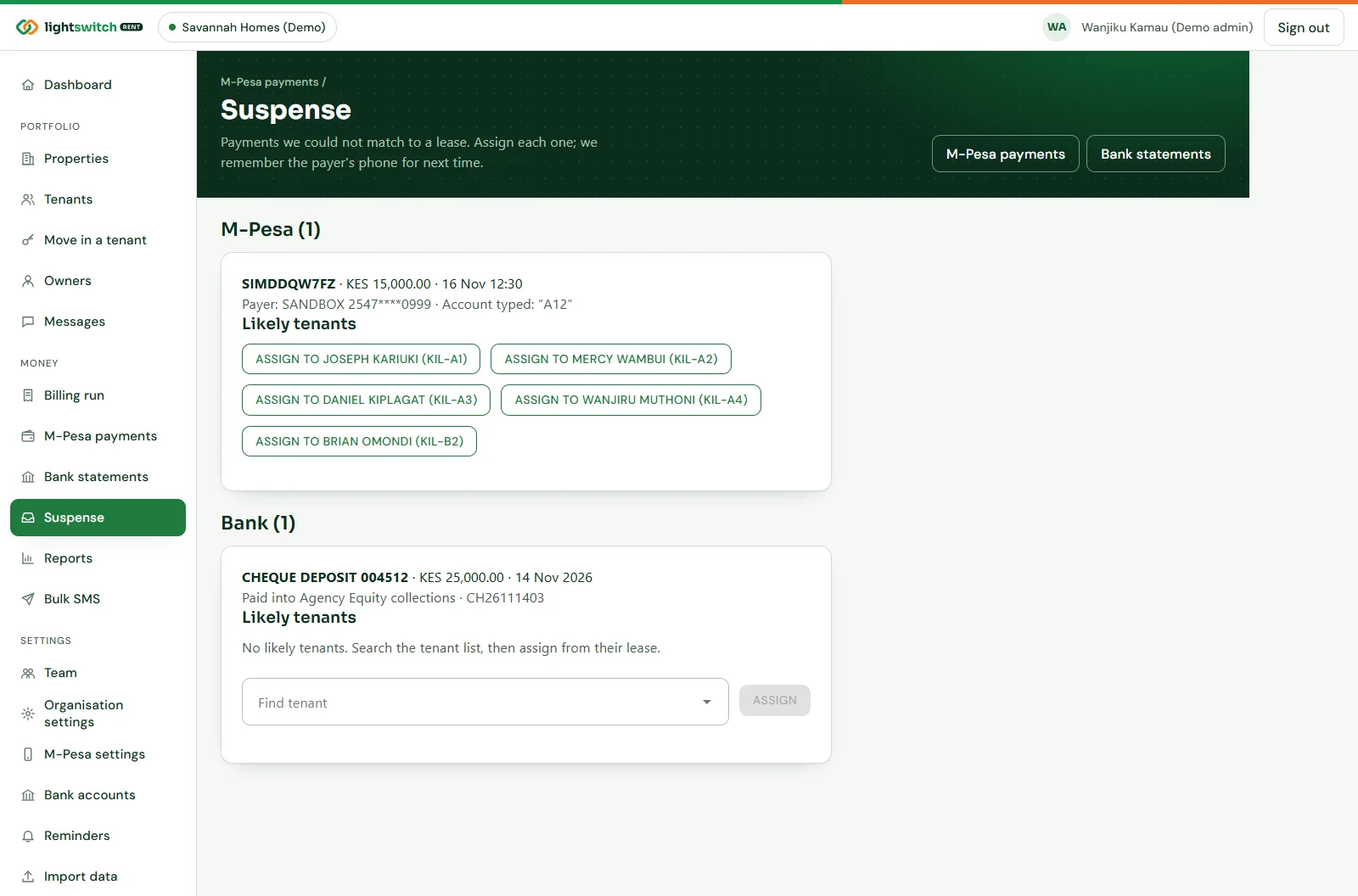
Payments matched to the right tenant in seconds
Connect your own Paybill or Till. When a tenant pays, the payment is matched by account number, unit, a payer seen before or phone number, receipted and confirmed by SMS. Your money goes straight to your account.
- Typos forgiven: “kil a3” still matches KIL-A3
- Unmatched payments wait in Suspense with likely tenants suggested
- Assign once and the payer is remembered next time
- Send an M-PESA prompt to the tenant’s phone from their lease
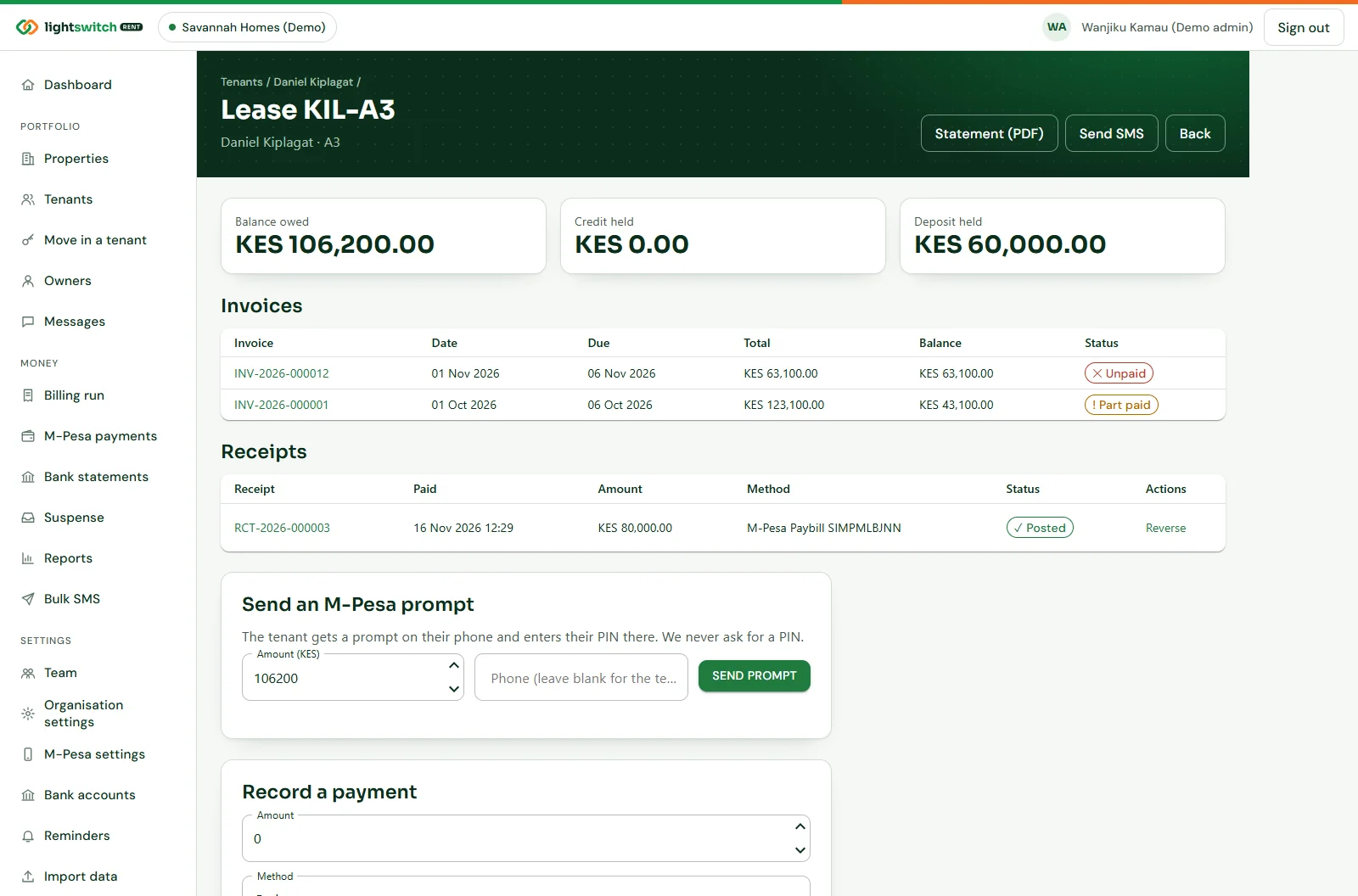
One page per tenancy, with every shilling on it
The balance owed, credit and deposit held, every invoice and receipt with its PDF, and the actions you need: record a cash payment, add a one-off charge, issue a credit note or send a prompt.
- Receipts allocated to the oldest invoices first
- Posted money is never edited: reverse and re-post instead
- Record which account money went into, the agency’s or the owner’s
- Tenant statement as a PDF in one click
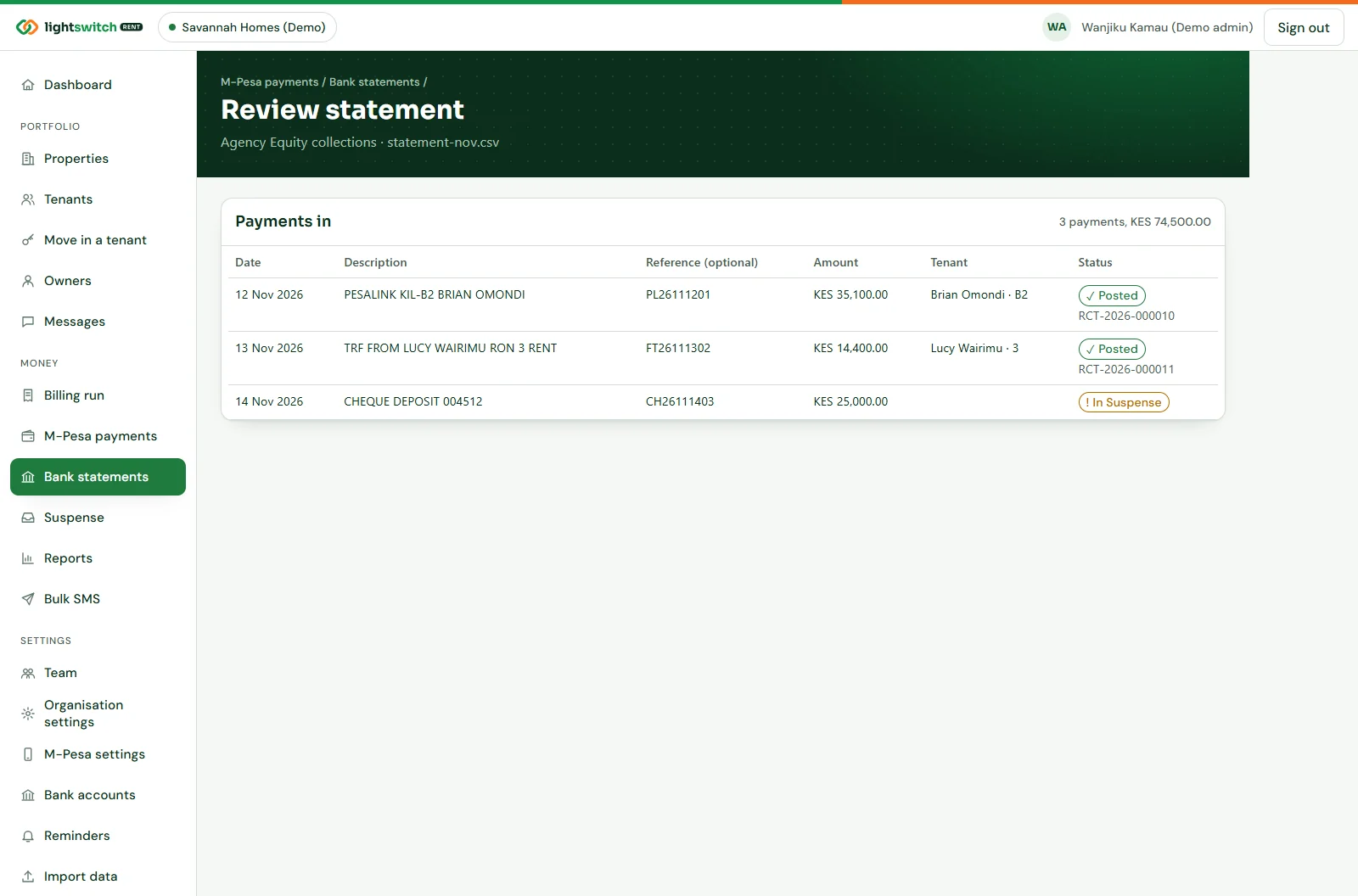
Reconcile the bank statement in minutes
Upload the statement from online banking as CSV or Excel. Lightswitch Rent reads the columns, matches each payment to a lease and lets you check every match before posting.
- Column choices remembered per bank account
- Lines already uploaded are skipped automatically
- Anything unmatched goes to the same Suspense queue
- Money paid straight to an owner’s account is tracked
Know who is behind before the month ends
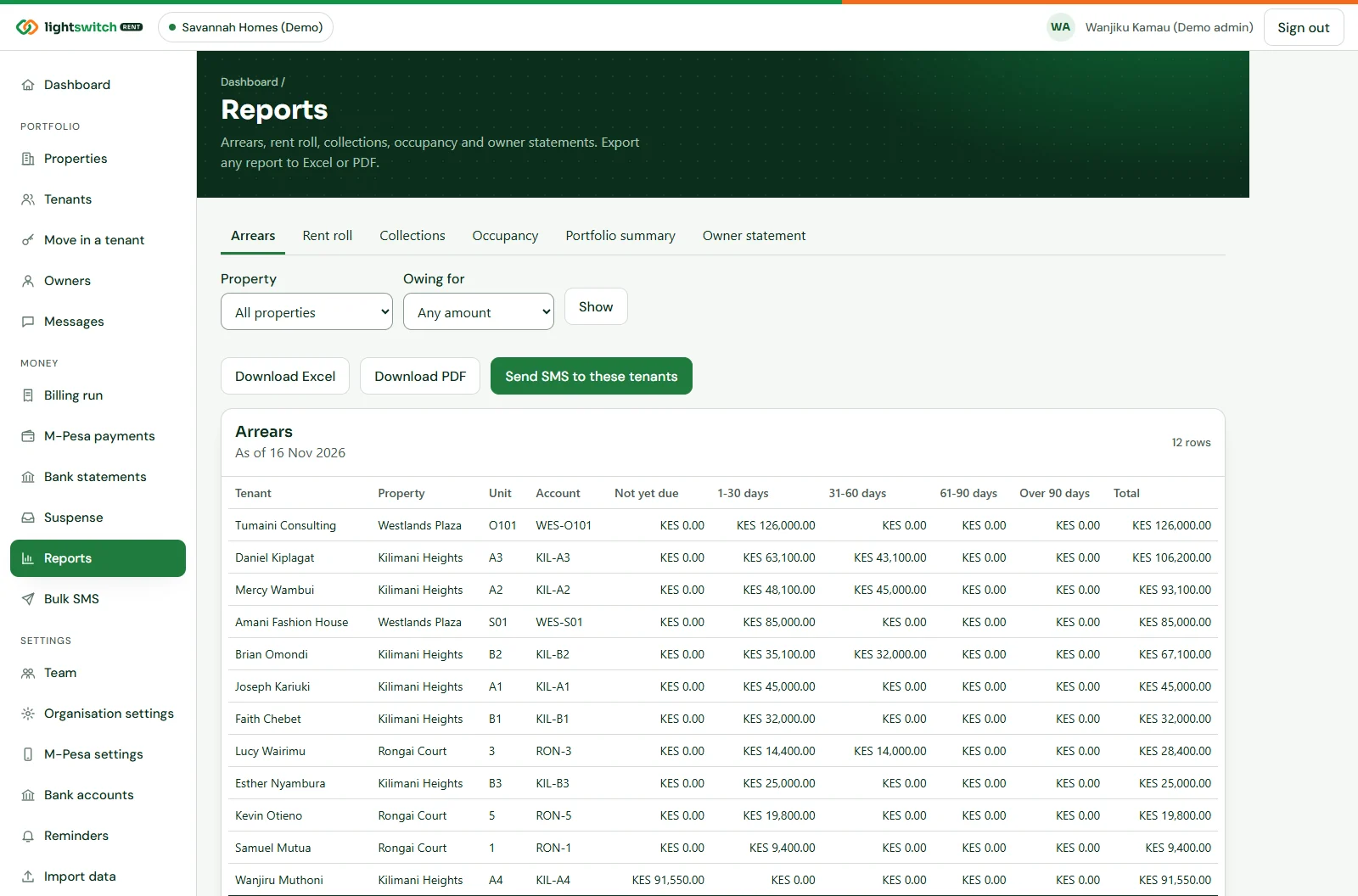
The arrears report ages every balance into not yet due, 1–30, 31–60, 61–90 and over 90 days. Send all of them an SMS in one step, or let the reminder schedule do it.
- Reminder steps per property, from 7 days before to 30 days after
- Bulk SMS with the tenant’s name, balance and account filled in
- Every message logged with its delivery status
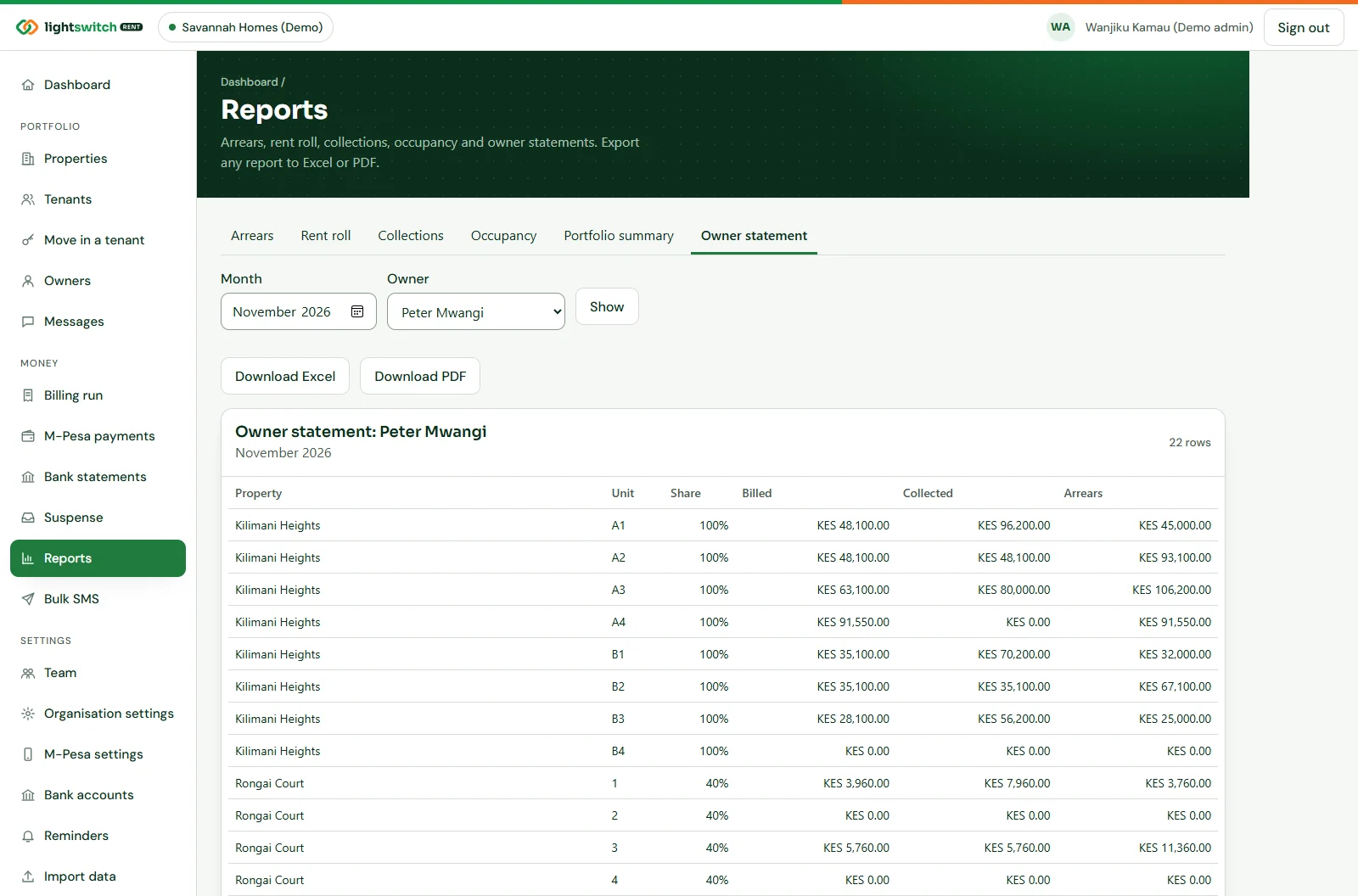
Owner statements that write themselves
For each owner and month: billed, collected and arrears per unit in their share, deposits held back, agency commission and the net due. The MRI estimate and its due date are worked out too.
- Shared ownership by percentage
- Commission on everything collected, including money paid to the owner
- 30% withholding for non-resident owners instead of MRI
- Download in Excel or PDF, ready to send
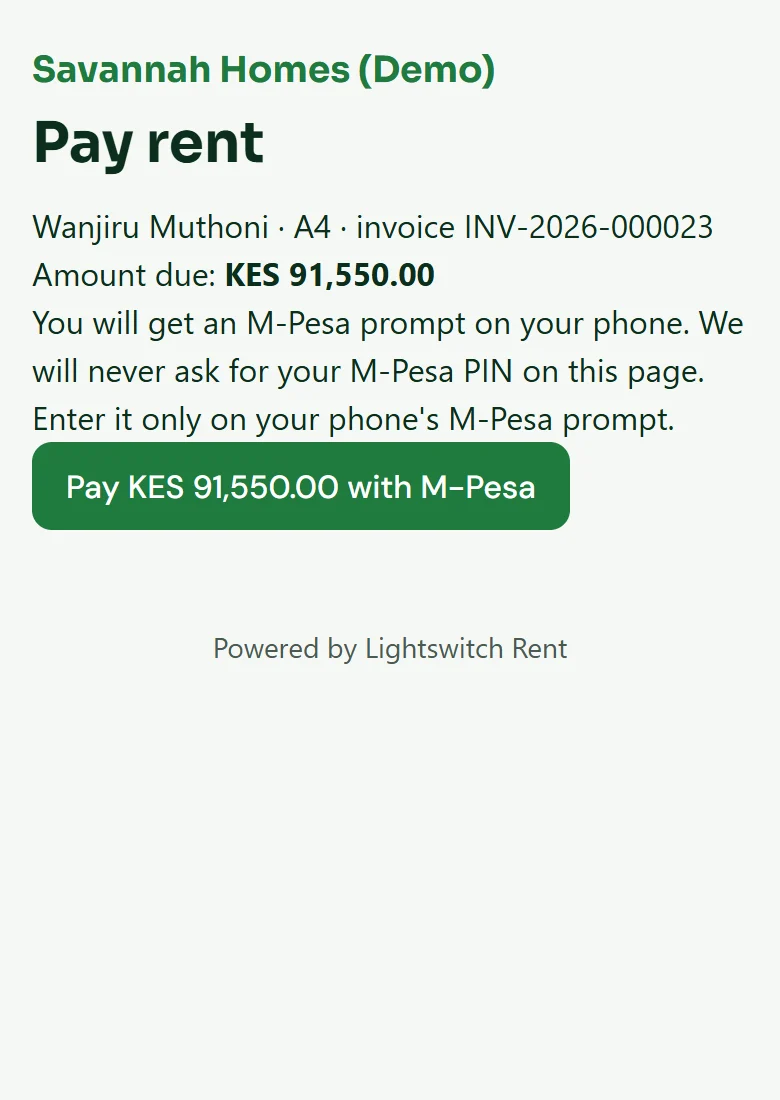
Tenants pay from the SMS. No app, no password.
Every invoice SMS carries a pay link that sends an M-PESA prompt to the tenant’s phone. The tenant portal shows their balance, invoices and receipts after a code by SMS, and every receipt has a QR code anyone can check.
- Tenants enter their M-PESA PIN only on their own phone
- Pages built to load quickly on 3G
- Fake cash receipts stop working
Who it's for
Made for the people who keep Kenya housed
Letting and management agencies
Many owners, commission on what you collect, and an owner statement for each of them every month.
Landlords with their own buildings
Bill and receipt your own tenants, see arrears at a glance and leave commission at zero.
Bedsitter and apartment blocks
Dozens of small units on one Paybill, each tenant with their own account number.
Commercial plazas and offices
Shops and offices with service charge, larger rents and business tenants with KRA PINs.
Caretakers on site
A caretaker sees only their own building, with no access to money or settings.
Owners who live away
A clear monthly statement, the MRI worked out, and withholding applied for non-residents.
Control
Your portfolio, your rules, a clear record
The right access for each person
Administrators, property managers, accountants and caretakers, each limited to the properties you choose.
Money is never edited
A wrong receipt is reversed and kept on record, never deleted. Numbers are never reused.
Receipts you can verify
Every receipt carries a QR code that shows whether it is valid or reversed.
Two-step sign-in and an audit trail
Required for anyone handling money or settings. Sign-ins, invitations and changes are logged.
Compare
Why not the rent book and the M-PESA statement?
| Feature | Lightswitch Rent | Rent book and M-PESA statement | General accounting software |
|---|---|---|---|
| M-PESA payments matched to the tenant automatically | Yes | By hand | No |
| A queue for payments nobody can place | Yes | No | No |
| Monthly invoices for every lease in one run | Yes | By hand | Partly |
| Invoices, receipts and reminders by SMS | Yes | By hand | No |
| Arrears aged by 30, 60 and 90 days | Yes | By hand | Partly |
| Owner statements with commission and MRI | Yes | By hand | No |
| Receipts anyone can verify | Yes | No | No |
A general comparison of approaches, not a review of any named product.
FAQ
Lightswitch Rent questions
Does it connect to M-PESA?
Yes. You connect your own Paybill or Till with your Safaricom Daraja keys, and payments are matched and receipted within seconds. The money goes straight to your account; Lightswitch never holds it.
What about bank transfers and PesaLink?
Upload the statement from your online banking as CSV or Excel. Lightswitch Rent matches each payment to a lease and you check the matches before posting.
Do my tenants need an app?
No. Tenants get their invoices, receipts and reminders by SMS. Each invoice SMS has a pay link, and the tenant portal works in any phone browser with a code sent by SMS.
Does it help with KRA rental income tax?
Owner statements show the residential rent received and the MRI estimate at 7.5% with its due date, and apply 30% withholding instead for non-resident owners. Filing on iTax or eRITS is still done by you or your accountant.
How do I bring in my existing tenants?
Download the Excel template, fill in your owners, properties, units, tenants, leases and opening balances, and import it. Nothing is saved until every row is right. We help with this during onboarding.
Does it bill water from meter readings?
Not yet. Water can be a fixed monthly charge per unit today, and one-off charges can be added to any lease. Meter readings are on our roadmap.
Where is my data kept, and who owns it?
Your data is yours. Each organisation’s records are kept separate, ID numbers, KRA PINs and M-PESA keys are encrypted, and tenants’ consent is recorded as the Data Protection Act requires.
Free demo
Get your Lightswitch Rent demo access
Send the form and we'll email you the demo link and sign-in straight away. We'll also call you to arrange a guided walk-through, by Zoom, phone or at your premises.
- 0724776933
- WhatsApp us
- hello@lightswitch.co.ke
- 51 Lenana Rd, Block A, Suite A4, Nairobi Kenya
- Mon–Fri 8:00–17:00